Server Administration Online Live Class by Experts
Our Training/Internship Process

Server Administration - Syllabus, Fees & Duration
MODULE 1
- What is Server?
- Client and Server Operating System
- What are Workgroup and Domain?
- How a Workgroup Environment is created
- How a Domain Environment is created
- Difference between Workgroup and Domain
- Types of Role in Server
- Overview of VMware Workstation
- Creation of Server in VMware Workstation
MODULE 2
- Understanding of Active Directory(AD) Service
- Understanding of Domain Name System (DNS) Service
- Check the Port Numbers related to Service
- Troubleshooting using Ping and Telnet
- Installing of Active Directory (AD) Service in Server
- Creation of Domain Controller (DC)
- Joining a PC to Domain Environment
- Checking the health of Active Directory Service (AD)
- Understanding services of Active Directory (AD)
- Creation of Users & Group in Active Directory (AD)
- Adding Users in the group in Active Directory (AD)
MODULE 3
- NTFS Permission(Share & Security)
- Configuring Read/Write/Modify & Special Permission
- Understanding Explicit & Inherited Permission
- Configuring Access Based Enumeration (ABE)
- Configuring Shadow Copies & Home Folder
- Installation of FSRM (File Server Resource Manager)
- Applying Soft & Hard Quota on Folder
- Applying File Screening on Folder
MODULE 4
- Need of Group Policy & How Group Policy Works
- User Policy & Computer Policy
- Default Domain Policy & Default Domain Controller Policy
- Group Policy Order and Precedence
- Configuring Recycle Bin Policy & Wallpaper Policy
- Configuring Audio Policy & Screen Saver Policy
- Benefits of Organization Unit (OU) & Creation of OU
- Blocking Inheritance & Enforce Policy
- Software Installation using Group Policy
- Group Policy Backup & Restore
- Prevent Policy Application using WMI Filter
- Domain Password Policy & Fine Grain Password Policy
- Configure Password Length, History & Complexity
- Account Lock Policy and Account Lock Troubleshooting
- Delegate access to User/Group for User Management
- Performing Mapped Drive using Group Policy
- Group Policy Troubleshooting steps
MODULE 5
- Need of Additional Domain Controller(ADC) & Creation of ADC
- Multi-Master Replication between DC & ADC
- Understanding of RODC (Read-Only Domain Controller)
- Replication between DC & ADC
- Checking ADC when DC is down
- Creation of Site & Subnet
- Understanding of Replication Schedule
- Replication between Domain Controllers (DC & ADC)
- Intra-Site & Inter-Site Replication
- Understanding of IFM (Install from Media)
- Working of KCC & Selection of Bridgehead Server
MODULE 6
- Importance of Flexible Single Master Operation (FSMO) Roles
- Understanding Forest level and Domain Level Roles
- Deep Dive into the working of each Role
- Perform Transfer of Schema Master, DNM Master
- Perform Transfer of RID, PDC, Infra Master Operations
- Impact on Domain when Role Holder DC is down
- Perform FSMO Role Seizure
- Active Directory Database Partition
- Understanding of Schema & Configuration Partition
- Understanding of Domain & Application Partition
MODULE 7
- Need of Child Domain & Creation of Child Domain
- Understanding of Multi-Domain Environments
- Adding New Domain to Existing Forest
- Understanding DNS Delegation & Forwarders
- Understanding of Multi-Forest Environments
- Creation of Trust between 2 Forest
- Type of Trust and Nature of Trust
- Type of Groups in Active Directory
- Security & Distribution Group
- Global, Domain Local & Universal Group
- Understanding of Global Catalog Server
MODULE 8
- Need of DNS & Active Directory Integrated DNS
- Host File, DNS Cache & DNS Zone
- DNS Forwarders, Delegation & Conditional Forwarders
- DNS A record, SRV Record, CNAME Record
- Recovering Active Directory from Disaster
- Active Directory Recycle Bin
- System State Backup of Domain Controller
MODULE 9
- Installing DFS Role on the Server
- DFS Namespace & Replication
- How SYSVOL Replication Works
- Installing DHCP Role on the Server
- How DHCP Works
- Understanding of APIPA & DORA Process
- Configure Scope, Exclusion, Lease, Reservation in DHCP
- Installing Windows Deployment Service (WDS) Role
- Configure Boot Image & Install Image
- Deployment of Operating System via Network (PXE Boot)
- Understanding of Windows Server Update Service (WSUS)
MODULE 10
- Installing IIS Role on the Server
- Creation of Website
- Performing DNS Round Robin
- Installing NLB and Creation of Load Balancer
- Need of Redundant Array of Independent Disk (RAID)
- Configure RAID 0 - Stripping, RAID 1 – Mirroring, RAID 5 - Strip Parity
- Understanding RAID 10 - Strip Mirror
- Understanding & Need of Virtualization Technologies
MODULE 11
- Need of Failover Cluster
- Installing Failover Cluster (FOC) Role on the Server
- Creation of SAN & ISCSI Disk
- Perform Failover Cluster
- Installing Active Directory Certificate Service (ADCS) Role on the Server
- Creation of Certificate Server
- Enterprise & Standalone CA
- Creation of Domain Certificate using CA
- Applying Certificate to the Webserver
MODULE 12
This syllabus is not final and can be customized as per needs/updates
- Since 2001, Making IT Experts by Experts
- Duration: 15 Hours (Vary as per your skill)
- Course Fees
- Individual Live Classes (1:1)
- Batch Classes @ Low Fees
- Training on Your Time, Any Where
- Access to Recorded Videos
- Practical Internship on Projects
- 100% Placement Support by our jobsNEAR.in
- Training/Internship Certificate
- Agra
- Ahmedabad
- Alappuzha
- Aurangabad
- Bangalore
- Belgaum
- Bellary
- Bhubaneswar
- Chennai
- Cochin
- Coimbatore
- Delhi
- Dindigul
- Erode
- Gulbarga
- Guntur
- Gurgaon
- Haryana
- Hyderabad
- Idukki
- Indore
- Jaipur
- Kalyan
- Kannur
- Kanpur
- Kasaragod
- Kerala
- Kolkata
- Kollam
- Kottayam
- Kozhikode
- Lucknow
- Madurai
- Malappuram
- Mangaluru
- Mumbai
- Mysuru
- Nagpur
- Nashik
- Navi Mumbai
- Nizamabad
- Noida
- Palakkad
- Pathanamthitta
- Pune
- Punjab
- Salem
- Shimla
- Solapur
- Surat
- Thane
- Thanjavur
- Thirunelveli
- Thoothukudi
- Thrissur
- Tiruchirappalli
- Tiruppur
- Trivandrum
- Vadodara
- Varanasi
- Vellore
- Vijayawada
- Visakhapatnam
- Wayanad
Course Highlights

Our Locations

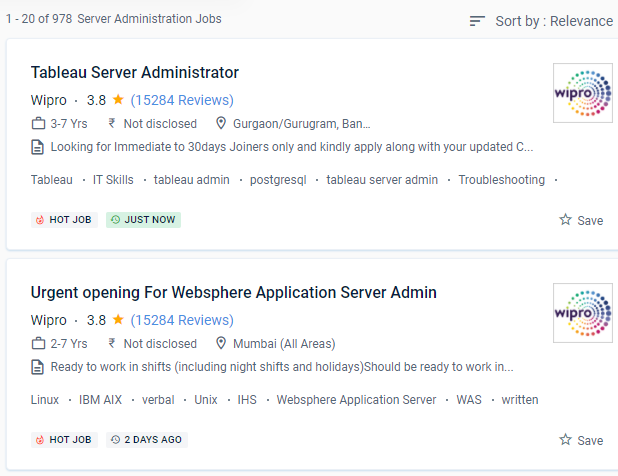
 Server administration encompasses all aspects of computer networking, including setup, storage, monitoring, and troubleshooting. The employee is responsible for troubleshooting issues on both the server and the PC. We've created a comprehensive course to suit the work requirements.
Server administrators can be hired in any company that has networks and physical servers. The course teaches, workers, rs the major administration skills required to support Windows servers in most enterprises. In this course, you'll learn how to use Windows server software to set up, operate, organize your server, as well as how to diagnose issues, brand your server as fault-tolerant, and more.
This online server administration training course will teach you how to use Windows Server to manage and maintain servers. Trainers are certified professionals who have worked on a variety of real-world initiatives. The syllabus was created with the idea of achieving career objectives in mind. Server administrators are in charge of monitoring data traffic in and out of the network as well as network security.
Server administration encompasses all aspects of computer networking, including setup, storage, monitoring, and troubleshooting. The employee is responsible for troubleshooting issues on both the server and the PC. We've created a comprehensive course to suit the work requirements.
Server administrators can be hired in any company that has networks and physical servers. The course teaches, workers, rs the major administration skills required to support Windows servers in most enterprises. In this course, you'll learn how to use Windows server software to set up, operate, organize your server, as well as how to diagnose issues, brand your server as fault-tolerant, and more.
This online server administration training course will teach you how to use Windows Server to manage and maintain servers. Trainers are certified professionals who have worked on a variety of real-world initiatives. The syllabus was created with the idea of achieving career objectives in mind. Server administrators are in charge of monitoring data traffic in and out of the network as well as network security.